SuperCard DSTWO hands-on preview

Wednesday, November 3, 2010


With the DSTWO now in house, we've just wrapped up our quick hands-on preview of the Supercard teams latest flash cart. With an onboard CPU that boasts the ability to emulate GBA games, play back XviD files directly and more, there's certainly a lot to test.
However, please bear in mind that we are currently using a pre-release version of the DSTWO EOS and as such there are various missing features.
So if you're interested in seeing how the Supercard DS TWO is shaping up and want to see some photos of the cart, GUI and maybe a video too - head inside this topic for all that and more!
Update: I've just been told that the DSTWO is able to overcome any kind of anti-piracy features that may appear in future titles. Utilizing the CPU, I'm told the DSTWO can pass through and bypass any anti-piracy measures which is the first cart to do so. They say the games will never need to be patched to run.
They tell me that the DSTWO CPU can emulate the original cartridge without patches, whilst others flash cart need a patch.

The Supercard DS TWO, having been in development for over a year and talked about for months, is the latest flash cart from the Supercard Team. It features the same on-board processor that was found in the iPlayer, but unlike the iPlayer, the DSTWO is a fully capable flash cart that can play DS ROMs.
The team behind the Supercard have been actively promoting the DSTWO and its supposedly unrivalled features. Additions such as GBA and SNES emulation, DivX/XviD playback and other realtime options including game guide mode, free cheat mode and slow motion are all key selling points for the DSTWO, but are they any good?


GBAtemp have been lucky enough to get an early preview sample of the DSTWO and have been actively testing it in order to give our members a little insight and help with their purchasing decisions.
Unfortunately the early version of the DSTWO loader we have is very limited in its functionality. Still nowhere to be seen are features such as SNES playback and any kind of media playback outside of Moonshell (that means no codec support yet).
GBA emulation
We'll first go into detail about GBA emulation which is undoubtedly the most anticipated feature.
The GBA emulator is actually heavily based off of Darkchen's GBA emulator that was previously found only on the iPlayer. It is an impressive emulator but unfortunately, besides a revamped GUI, the emulator appears to perform the same as it did several months ago back on the iPlayer. The majority of GBA games perform very well when the emulator is set to a slight frameskip, but there are still a handful of ROMs that are unplayable due to slow down or graphical glitches.
I personally think most users would be happy with the current state of the emulator, especially given the amount of options that are available, such as state saving, frameskip, fast forward, snapshot, key mapping and more. But bear in mind that there will likely be a few titles that will remain unplayable. Hopefully either Darkchen or the Supercard team are able to further optimise the GBA emulator and iron out any remaining issues.

Other System emulation
SNES emulation, a feature touted by the Supercard team is currently unavailable and so I am unable to comment on it. I do honestly believe that this feature will come in time, so I'm not too disappointed, as I have also heard and can confirm that the Supercard team plan to not only add SNES emulation but also other consoles such as the Neo Geo and possibly more.
The GBA emulator, and also any other features that make good use of the DSTWO's onboard CPU do decrease overall DS battery life. From my limited testing, my fully charged DSi battery performed well for a good 4 hours before dying.
Other features
I am also unable to comment on DivX/XviD and other codec support/playback, as these features are currently unavailable. They will most likely perform just as well as they did on the iPlayer as the hardware found in the DSTWO is basically that which was found in the iPlayer. Remember to keep a watch out for our full written review of the DSTWO in the next few weeks for more information on features that are currently missing from our review sample.
I assume Moonshell is where multimedia playback (DivX/XviD) will be handled, but I am not yet certain. The Moonshell install is quite a standard install and doesn't appear to offer anything out of the ordinary but I will update when this is clarified.
The EOS GUI
The Supercard DS TWO uses a slightly enhanced version of the EOS (Evolution OS, which is also on the DSONE). My DSTWO came pre-flashed for DSi 1.4 compatibility, but I can't confirm at this time whether or not this is factory default. Please stay tuned for more info on that.

Once booted, the DSTWO presents you with a DSi style main menu, from which you can choose what mode you want to enter. There are currently 5 modes - DS ROM mode, GBA emulator mode, Moonshell mode and 2 slot-2 boot options. These options, if you so wish, can be modified by editing some files inside the OS system folder.
The DSTWO OS can run in various languages including English, French, German, Spanish, Italian, Chinese and Japanese.
The main EOS is found by entering DS ROM mode. This is the screen from which you can launch your DS ROM files. The menu is very well presented, with file management options, DS ROM information, skinning options, config screens and more. Please take a look at the photos or videos we have provided to check it out for yourself.
The menu is very fast and responsive with a file listing shown on the bottom screen and time/date and ROM information on the top DS screen. As long as you know where you're headed, you can launch DS ROMs within 5-7 seconds of booting into the DSTWO.
Once you have a DS ROM loaded, you can enter the EOS realtime menu by hitting the default key-combo of L+R+A+B+X+Y (which can be altered to whatever you wish). A very nicely presented menu will appear on the bottom screen with six options - Game Guide, Cheats, Real Time Load, Real Time Save, Slow Motion, Free Cheat, brightness and reset (takes you back to EOS DS ROM menu).

ROM compatibility
As it stands, I have not yet encountered any incompatible DS ROMs on the DSTWO. I suspect compatibility will be similar to the DSONE.
When DS ROM compatibility is a concern, the Supercard team have an absolutely fantastic track record when it comes to supporting their flash carts. They are still releasing updated software for their original slot-2 DS flash carts and I doubt that this will change once the DSTWO starts receiving updates.
Realtime features

The realtime menu is very impressive, with a clean graphic rich interface compatible with the DS face buttons or stylus.
Game guide supports TXT and BMP files and allows you to scroll through the document(s) and will remember where you left off previously. A very handy feature and it appears to work very well.

Cheat mode is a simple cheat interface compatible with R4DS and TTDS compatible cheats.

Real time save works great, and gives you up to 4 slots which you can name individually. I have been told that the realtime save feature has been updated to improve compatibility with 3D DS games.

Slow motion gives you the ability to slow down game play with 4 levels of slowdown. I have tested it and it works pretty well. There are some slight graphical anomalies in game, but it's easy to work around and hasn't caused any major problems on any of the games I've tested it on. The slow motion is quite stable and runs at a steady pace whatever setting you put it on.

The free cheat mode, a new feature that is exclusive to the DSTWO allows you to search for and enable cheats within games when you don't have cheat files downloaded. For example, for new games that have just been released for which there aren't yet cheat databases, you'll be able to play around with this free cheat mode and search for potential cheats without having to use your PC or even exit the game.
It is actually quite complicated to get your head around to begin with, especially people that aren't familiar with cheating to begin with. It is quite easy to modify in-game values for things such as coin, points or life counts, but I have not yet figured out how to get it working with in-game values that are not represented by numbers.
It basically boils down to this process: For example in New Super Mario Bros. Your coin count may be 3. Open up Free cheat mode and do a search for the value "3". It will normally return thousands upon thousands of potential results and will ask you to search again to narrow it down. Go back into the game and increase your coin count to 4 for example. Go back in to Free Cheat mode and search again for "4". This will normally return just a few results as the DSTWO begins to understand what result you are searching for. Do this one or two more times by repeating the process by increasing coin count and the free cheat mode will eventually return the one and only result.
You can then modify this results value and it will be immediately changed in-game. You can save this value and give it a name for future sessions. You can even "lock" values. They will be set to whatever you chose, and will not change, no matter what happens during gameplay. For example, you will never die when hit because your coin count will always be positive.
Unfortunately, I am completely lost on the "fuzzy search" mode and have requested more information on this and will update when I have understood it.


Everything else...
The DSTWO comes in a box shaped much like the one for the DSONE and the iPlayer. The box contains a brief manual, the DSTWO itself and a micro SD card reader.
The DSTWO is a black cart with a shiny back label and spring loaded micro SD slot. The cart is held together by a single screw and several prongs inside the plastic mould. The cart does have a slight bulge to it where the chips protrude outside of the casing, and it does feel somewhat tight inside the DSi's cart slot, but it clicks in place fine.
As some eagle-eyed readers have mentioned; the DSTWO does not come with a separate firmware flashing device such as that bundled with the DSONEi. This also needs to be clarified by the team so stay tuned for updates, but I assume this can and will be done by the DSTWO itself once powered on inside a Nintendo DS/DSi because of the onboard CPU.
As it stands, the DSTWO is a great cart so far - the onboard processor alone makes it worth having. I don't think it's fair to comment on or rate the DSTWO at this point in time, as it's clear to me from the missing features that the EOS isn't quite finished yet.
Whether or not these missing features will make it into the EOS before release in a couple of weeks time remains unclear, but I rest assured knowing that the DSTWO is coming from such a reputable company as the Supercard Team and have no doubt that they'll deliver on their promises.
Stay tuned to GBAtemp for our full written review and any futures news or developments.
Supercard DSTWO photos including press release photos


 Buy supercard ds two from http://iflashdsi.com/supercard-ds-two-for-nintendo-ds-ds-lite-dsi-p-23.html

DSTWO Compatible (DSi firmware 1.4.1) DSi console

Sunday, September 12, 2010

1. There is a *.dat file copy to MicroSD, DSTWO can auto detect it and run it. Now we use now.
If DSTWO be blocked.

2. DSTWO rather special designed, just replace a system file in MicroSD can jailbreak DSi.
If method 2 also don’t work

3. DSTWO has powerful built-in CPU. Even it has been totally blocked by DSi. Just insert the DSTWO into the DSi, the DSi provide the power to the slot 1, DSTWO CPU still can get power from it, than, DSTWO CPU can run a special upgrade file in MicroSD.
Tips: Method 2 and 3 should have a built-in CPU which DSTWO has.

To use: download the .zip file and copy “system1.dat” to “root/_dstwo”folder and replace the same-name file.

source: http://forum.supercard.sc/thread-7008-1-1.html
 
Buy supercard ds two from here!

DSTT Installation Guide

Wednesday, September 1, 2010

1. Download Software


Depending on your card, download the below ZIP files (choose the one that's correct for your card) to your computer. It contains the menu files for your card.

Please make sure you have got the right card and have purchased it from a legitimate vendor who sells quality products, before using the software here. WE CANNOT GUARANTEE THE SOFTWARE BELOW IS THE EXACT SOFTWARE FOR YOUR DSTT CARD. This is because the official downloads will not work with fake / imitation cards. NDS-Gear has kindly allowed us to use their servers to link to the official DSTT software.

DOWNLOAD SOFTWARE HERE FOR:

Download DSTT Software (Fast U.K. based website)

Download DSTT and DSTTi Software (China based website, official)

2. Open Download

Open the compressed folder and save the files on your computer or to the desktop. The download may contain several files and folders.

3. Plug in Micro-SD/TF Card

Using the USB card reader or the Micro-SD memory reader, connect the Micro-SD memory to your computer. The memory will show as an external hard drive (i.e. "F:\").

4. Format Micro-SD/TF Card

This step is important, please make sure you follow the instructions closely. (For a better set of instructions look at 4b below, but takes a bit longer) After Windows has added the card as a new drive, open the "My Computer" window and right click on the new removable drive. Then select "Format" from the menu. In the format window select FAT32 as file system and press OK to format the card.

All content on the Micro-SD card is now deleted and the card is ready for the use with your card. If you have important data on the Micro-SD memory make sure you save the data somewhere else (i.e. your local hard drive) before you complete this step.

4b. Alternative to Formatting Micro-SD/TF Card

For people who find that formatting their Micro-SD card in Windows doesn't work and they would like to try something else, using the Panasonic Formatter is actually better than using Windows to format your Micro-SD card. Download it from here and format your card - while you need to download the program and run it, everything is automatic.

5. Copy files to Micro-SD/TF memory

Copy / drag-and-drop the items previously unzipped to the newly formatted MicroSD memory.

A- Loading the game kernel: Copy the "TTMENU.DAT" at the directory of the simplified game kernel/ traditional game kernel to the root directory of TF card.

B- Loading the media kernel: Copy the "moonshl" folder and TTMenu folder to the root directory of TF card;

Correct way to insert the micro SD card into the DS CardAdd Media to Micro-SD cardCopy your media directly onto the Micro-SD memory. This completes the setup process.

6. Unload the Micro-SD/TF card

After finishing ROM added, then right click the removable disk icon on the right down corner of the screen; Draw out the TF card from card reader/writer.

7. Finishing up

You can now insert the Micro-SD memory into your DS card and start using it with your Nintendo DS / DS Lite. Make sure your micro SD card is inserted correctly into the DS card as shown in the picture.

Note for DSTTi Users

If applications don't load correct, try placing them in a "Games" folder instead of in the root directory. This solves a file structure related 'tidiness' issue and also makes the files on your card more organised. :-)

acekard 2i  m3i zero supercard ds two dstti

Why R4ids.com changed to R4ids.cn??

Recently,gamers always complained that they cant play games or cant find the latest kernel from www.r4ids.com .We have received a lots of this kind of question .

Because the web site administrator stole the password of the web server and changed the content of the official web site( www.r4ids.com),we have put latest kernel on our new official web site : www.r4ids.cn .(Opened on Aug 27,2010).
The package of r4ids gold has never been changed and the r4ids gold team will keep updating the kernel to support games released recently.
All flashcarts with r4ids gold logo ,which can not support the old version kernel of r4ids gold,are fake ones.
Recently, as part of inadvertently buy counterfeit cards game players can not run there, LOADING death, sleep of death etc., please returned as soon as possible to buy land to protect its own interests! ! ! www.r4ids.cn purchase, please look for the only official website! ! !
As for R4i gold revolution card,we have a news that the official site has been changed from www.r4ids.com to www.r4ids.cn .All kernels will be only updated on www.r4ids.cn .
The current latest kernel is v1.35 ,or you can go to download the kernel from
http://www.r4ids.cn/
Let’s review the function of R4i gold .
-The world’s first host system to support the DSi upgrade to V1.4

-Compatible with all DS editions of different kinds of language

-Supports DSL / DSi / LL / XL

-Supports Action Replay cheat

-DLDI auto-patching

-Support SDHC (Micro SD 4G,8G,16G,32G)

-2nd generation storage device (no booting tool required)

-Flush fitting slot 1 card

-Uses MicroSD card, FAT16 or 32

-Supports any MicroSD card speed with no lag in game

-Supports Clean ROM, drag and drop. Works on any OS

-Built in NoPass

-Automatically detect save type

-Save directly to MicroSD card, not to onboard chip

-Supports Moonshell and other homebrew.

-User friendly skinnable interface. Touchscreen or button operation

-Supports rumble pak and memory pak

-Supports the WiFi game, DS Rumble Pak, DS Browser

-Supports changes of the background of Operation Interface

-Support Skin DIY by setting background and font colors on Main Menu and Game Menu manually and automatically

-Supports 4-scale-lightness adjustment ( DS Lite only )

-Supports the Soft Reset.

-moonshell 2.02 support Software Reset function( Press START key back to the R4 menu)
 
acekard 2i  m3i zero  supercard ds two  dstti  

DS ONE SDHC EOS SP4 DOWNLOAD

Tuesday, August 17, 2010

We are sorry but just post this news on our blog, just need to be sure that this version is completed and has no bug .Till now we didn’t get any bug claim from SD forum .:)

1. Fixed 5140 Galaxy Racers reading save data error problem.


2. Fixed 0856 Bleach 2nd can not save problem.

3. Fixed 5116 Keshikasu Japanese version (clean mode).

4. Fixed the cheat code blank list problem in some games.

5. Added GBA linkage function.

Q: How to use GBA linkage function?

A: Usage: NAME.nds, NAME.nds.gba, NAME.nds.gba.sav. These three files are DS game file, GBA game file, GBA game save. NAME which can be user defined. This feature is selected by the user to open, choose the interface in the start menu, select system settings functions.

6. Added the wii linkage functions.

7. Added support ez3 in 1, supercard lite, supercard mini sd, supercard sd, supercard cf.

8. Added provent halt in castlevania: Portrait of Ruin.

SP4 EOS Download:

DSONEi SDHC Evolution V1.0 SP4 (eng)

Didl fies download:

(New edition)SDHC DSONE/i

Acekard 2i  m3i zero  dstti supercard ds two  supercard ds one supercard ds onei  R4i rts  itouch2 
m3 ds real  iEdge

Supercard Team released DSTWO v1.04 EOS

Wednesday, August 11, 2010

We are happy to inform that that SC team just released the v1.04 EOS for Supercard ds TWO ,let’s see more updates as below,
1、Fixed 0396, 5140 Galaxy Racers reading save data error problem.
2、Fixed 0856 Bleach 2nd can not save problem.
3、Fixed 5116 Keshikasu Japanese version (clean mode).
4、Fixed the cheat code blank list problem in some games.
5、Added GBA linkage function.
Q: How to use GBA linkage function?
A: Usage: NAME.nds, NAME.nds.gba, NAME.nds.gba.sav. These three files are DS game file, GBA game file, GBA game save. NAME which can be user defined. This feature is selected by the user to open, choose the interface in the start menu, select System Settings option.
6、Added the WII linkage functions.
7、The main menu by using cyclic mode.
8、Added support ez3 in 1, superCard lite, superCard MINI SD, superCard SD, superCard CF.
9、Update Korean language package.
10、Added prevent halt in Castlevania: Portrait of Ruin.
Note: Old version patch database can not be use in new OS.
Brief introduction
System Edition:V1.04

System Capacity:50.67MB
Language:Multi-Language

Download: SCtwo v1.04 EOS

DSTWO only $34.50 ,please click here to buy

http://www.digimartz.com/supercard-ds-two-scds2-for-nintendo-ds-ds-lite-dsi_p678.html

Supercard ds two Some news about SNES emulator

Friday, August 6, 2010

From the Chinese forum official news:


I saw many members are looking forward to the SNES emulator for the Supercard DS TWO. And someone said it will be released in the middle of July. So i ask the team, and got a bad news:

It has to be delayed, cuz they are working on the SDK, but it's unsuccessful :s

They hope SDK can be released this month, then contine to work on SNES emulator.
But... i had got the Engineering version SNES emulator, there is no UI/Extensions atm, just run like a DOS :p
So it's very hard to test, so i just tested some hot titles:

FIRE EMBLEM GENEALOGY OF HOLY-WAR

Fire Emblem Thracia 776

Final Fantasy VI

DQ IV

Chrono Trigger

Super Robot War 3

Super Robot War 4

Ogre Battle

Yuu Yuu Hakusho Final - Makai Saikyou Retsuden

Zelda

Castlevania

Goofy

I found the compatibility is better than I imagined, and the speed is very fast! But there are some problems too, like the sound. the sound is not smooth in some games. But many games like Fire Emblem the sound is not smooth when at the title, but after started the game, it sounds nice.
 

Supercard DStwo Latest EOS is released.

Wednesday, July 7, 2010

A latest EOS for Supercard ds two has been released.See the features as below,


1、Fixed 2971 Star Wars Clone Wars.
2、Fixed save corrupt problem of 0856 - Bleach DS 2nd - Kokui Hirameku Requiem (JP) (WRG).
3、Enable to modify the desktop icon “DS_GAME”, just edit the dstwo_game.ini file (it’s in “_dstwoplug” folder, edit the same way as other plug-ins).
4、Added a sort type, text list.
5、Fixed a bug which touch invalid of text part in file list.
6、Fixed reset in the game return to desktop, switch to game list
7、Fixed the amount of shin limitation.
8、Changed desktop icon from cycle show to single way, and removed the space plug-in icon.
9、Fixed the real-time menu splash screen problem.
10、Enhanced homebrew compatibility.
11、Fixed Eigokoro Kyoushitsu DS(J) The save file size should be 64Mb, please del the old 512kb save file of it.


Note: Old version patch database can not be use in new OS.

Download ,please click here .

Have problem on installing EOS?
Step 1 Download the OS ,click here
Step 2 Unzip and copy the system folder _dstwo to the root of microSD.
Step 3 Copy the game files to the microSD, insert the microSD into Supercard DS TWO.


Acekard 2i   supercard ds two   m3i zero   iEDGE DS Card   itouch2   SuperCard DS ONE   Supercard DS ONEi

Supercard ds two FAQ

Monday, July 5, 2010

  Q:What is DSTWO different from other flash cart?


  A:DSTWO is real the 2nd generation flash cart, built-in powerful CPU, can emulate GBA and can provide more powerful function. Other flash cart can’t do this without the built-in CPU.

 Q:How to install DSTWO OS?

  A:Please reference to the manual

http://eng.supercard.sc/manual/dstwo/use.htm

  Q:Why I can’t enter DSTWO menu?

  A:1. Make sure use the correct OS version. There are two version of DSTWO, English version and Chinese version. English version hardware can only use English version OS.

2、Insert the TF card or DSTWO again, maybe this is poor contact problem.

 Q:Can SuperCard DSTWO use on DSi, DSiLL and DSiXL?

  A:Yes. SuperCard DSTWO can use on all DS series. NDS, NDSL/iDSL, NDSi/iDSi, NDSiLL/DSiXL.

  Q:Can DSTWO boot slot 2 flash cart on DSL?

  A:Yes. There is a menu on DSTWO system menu to boot slot 2 flash cart.

  Q:Can DSTWO run homebrew?

  A:Yes. Such as moonshell, colors etc.

  Q:What size of MicroSD does SuperCard DSTWO support?

  A:DSTWO support SDHC, up to 32GB.

  Q:Does SuperCard DSTWO support multi-language?

  A:Yes. DSTWO support 7 languages. English, Simplified Chinese, Traditional Chinese, French, Italy, Japan, Spain, in seven languages, can be easy change. And it’s very easy to make new language package.

  Q:Can DSTWO play movie directly without convert like iPlayer?

  A: Yes. But not at the launch time, actually, DSTWO CPU is more power than iPlayer CPU, we need time to develop a powerful movie playback software to release DSTWO multi-media power.


 Buy Supercard ds two from here:  http://www.digimartz.com/supercard-ds-two-scds2-for-nintendo-ds-ds-lite-dsi_p678.html

SuperCard DSTWO Official Review

Thursday, June 24, 2010

The SuperCard DS TWO (SCDS2), released by Team SuperCard, has been dubbed the 2nd generation of DS Slot-1 Flash Kits. Since the introduction of Slot-1 Flash Kits, users have continually desired new features, better support, and advancements from the developers. The SCDS2 attempts to appease the user with an on-board CPU capable of GBA Slot-1 emulation. Team SuperCard has additionally promised SNES emulation, drag/drop video playback, on-the-fly anti-piracy advancements, an in-game menu system, slow-motion, soft-reset, a real-time cheat editor, and more.

This review will focus on the current DSTWO EOS v1.02 firmware and its features. Features not currently available will be mentioned and discussed based on publicly available information. The review kit will be tested on a DSi XL and a 2 GB Japanese Kingston microSD card. NDS compatibility will be tested with both NDS Homebrew and NDS ROMS and the GBA EMU will be tested with both GBA Homebrew and GBA ROMs. All review photos will be taken using the “SILVER” EOS v1.02 included theme.

Official Features List (Corrected):

* Real time functions: real-time save, real-time game guide (txt, bmp, jpg), and real-time cheat.
* Multi-saves (up to 4 slots), easy to back-up and restore saves.
* Unlimited microSD storage space support. SDHC support. FAT or FAT 32.
* Multiple languages.
* Built-in GBA/SNES Emulator.
* Action slow motion (4 levels).
* File management system (copy, paste, cut, and delete). Long file name support.
* E-book in .BMP, .JPEG, .JPG, .PNG, .TIF, .GIF, .TXT, and .PDF formats.

The official features contains some “Engrish”, misspelled words, and dual index formatting. Based on the package description, someone with little to no knowledge of this hobby might easily pass this card off as being “cheap junk.”

The list includes the phrase “unlimited microSD storage space support,” a selling tactic lie for which I have no appreciation. The included paper manual has an image of a microSD card and the box includes the phrase “SDHC” and a printed SDHC logo. This card clearly only supports SDHC external media, and as consumers we know that the limitation of SDHC cards is 32 GB.

The list mentions SNES emulation, something which has not yet been implemented by Team SuperCard or the EOS Operating System.

E-book support includes a listing of mostly image formats and skips some dedicated E-book formats (.EPUB, .LIT, .LRF, .MOBI, etc). I would have preferred that the image formats were listed under an appropriate Image heading and for .TXT and .PDF to remain under the E-book heading.

The feature list lacks any mention of video/multimedia formats. The card was publicized as supporting drag/drop video codec playback. This is another feature not yet implemented by Team SuperCard or the EOS Operating System.

Oddly there is no mention of the “plug-in” system for creating custom icons used as launching points for NDS Homebrew and NDS ROM files. This is an interesting feature which not only helps organization through a favorites list but provides a way for users to personalize their theme.

Contents:
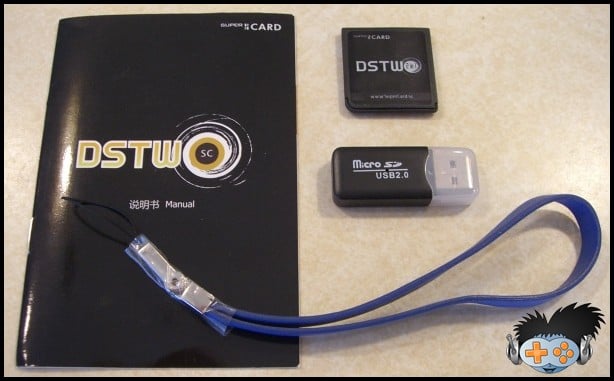
  • 1x SuperCard DSTWO
  • 1x microSD reader
  • 1x User manual (in "Engrish" and Chinese)
  • 1x blue leather wrist strap
Packaging:


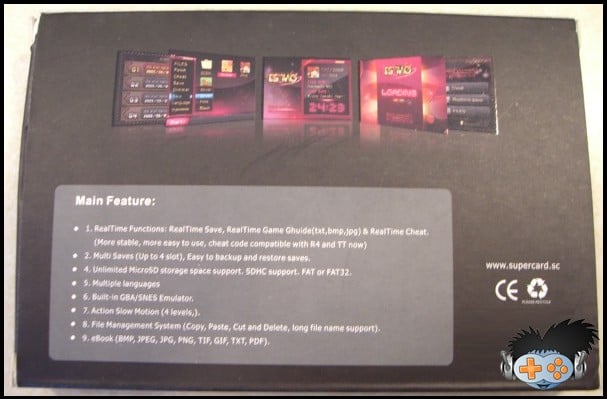
The SCDS2 ships in thin matte black colored cardboard box. The box measures approximately 5 and 1/2 inches by 3 and 3/4 inches by 3/4 of an inch. The left and right sides of the box fold inwards and secure with a cardboard flap. The box is printed with the “SuperCard” logo on all sides but the bottom. The top of the box includes a shiny DSTWO logo, a SuperCard Team logo, and a SDHC logo. The bottom of the box includes 3 shiny firmware screen captures of the EOS software. Also found on the bottom of the box is the official “Engrish” features listing and an official SuperCard URL (www.supercard.sc).


supercard ds two supercard ds two


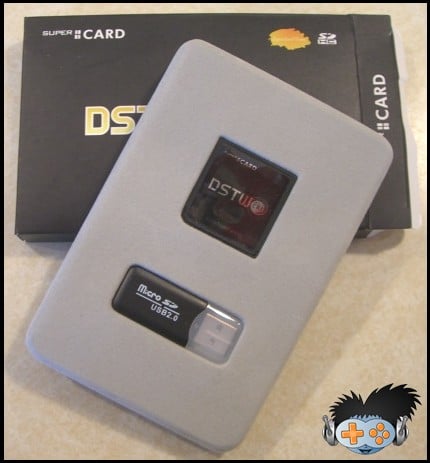
The box protects a thin plastic felt covered tray which slides in snugly and holds the SCDS2 and the microSD reader. Both of these items sit tightly into their respective cutouts, so well are they contained that users have reported damaging the shell of their SCDS2 while attempting to remove it. Removing either item is a simple as pulling out the tray and pushing on the back side to allow the item to lift away from the packaging. Under this tray sits the paper user manual and leather wrist strap. The wrist strap was not initially available for pre-ordered kits and later SCDS2 offered the strap as an additional purchase for resellers, causing each reseller to manually insert the wrist strap into each box. As a result of this some users have purchased a SCDS2 and not received the wrist strap, thus making it optional for the reseller and a random bonus for the buyer.


supercard ds two supercard ds two


The included microSD reader measures approximately 1 and 3/4 of an inch by 5/8ths of inch by 2/8ths of an inch. The black colored plastic shell feels smooth and sturdy to the touch. The USB connector is protected by a clear plastic cover which slides and locks into the plastic shell. If the cover is reversed it will not lock shut and should not be forced. This microSD reader is a functional alternative and a nice addition to the internal packaging contents, however, it is much larger than my preferred solution and from a generic manufacturing factory. The longevity of this microSD reader based on build quality alone seems fairly long, yet only time will tell.


supercard ds two supercard ds two

How to solve r4i gold game cheat and game save problems?

Tuesday, June 22, 2010

How to operate the game cheat on DS console kinda problem to newbie who is just trying to get fun but failed.With R4i gold card,
you can remove this kind of problem out of your worries.Now let’s see more details on how to operate game ,install game cheat and game save method.as below,
Game Menu Operation

- Choose the ‘Game’ to enter Game GUI; Press ‘START’ to go back to main menu.
-Press the ‘SELECT’ key to select the display mode in game interface (”File Display” and “Game Display” , Default is “Game Display”), “N files” and “N game” display at top bar on the top screen.
-Please be aware that the “SHELL,MOONSHL,_SYSTEM_”directory and the “_DS_MSHL.NDS “file will be hidden under the “Show Games Only” mode; Any other directories or files with hidden attributes will also be hidden.
- You can choose the display model (”Display all” and “Only Display Game”, default is “Only Display Game”) by pressing “SELECT”, and the top screen will display “N file” and “N Game”.
Please be aware that the “SHELL,MOONSHL,_SYSTEM_”directory and the “_DS_MSHL.NDS “file will be hidden under the “Show Games Only” mode; Any other directories or files with hidden attributes will also be hidden.
4-scale-lightness adjustment is available to the D Lite console by touching the sunny icon at the top left corner of game interface. (Not available to D console, the sunny icon will turn to be gray if it is D console.)
At the right top of the touch screen it is the “Soft Reset”; Red indicator means the “Soft Reset” function is off; Green indicator means the “Soft Reset” function is on. The users may point on the touch screen or press “R” button to switch the “Soft Reset” On/Off.
While the “Soft Reset” function is on, pressing “L+R+A+B+X+Y” can go back and forth to the game’s main menu; Please do not do this while saving, as it will lead to malfunction, It is recommended to go back to main menu before you function the “Soft Reset”.
If the error occurs on running games, please try to turn off the “Soft Reset”.
- The top screen displays the files under the directory, ‘Up/Down’ key for rolling, ‘Left/Right’ key for flipping. The current path and amount of the total files will show on the top, the scroll bar will show the location of the current file.
- The files under the directory will be sorted by file name, the directory (DIR) will display at the front. The (..) is the parent directory.

- The bottom screen display the details of the files and directory, the icon and title will be displayed if it is D/ID game.

- Press ‘A’ button or touch screen to enter the corresponding functions or run the game, press “B” button to go back
Running Game
- Choose the game you like in the game menu; Press ‘A’ button or touch screen to run.
- You can check the modified time of the archive, as it will be edited automatically while running the game.
- The file name of the archive is the same with the games, the extension is .SAV, can be backup or restored from PC at anytime.
SAV backup copy, restorationc
The archived file master file name with game same, expansion named .SAV

1. May momentarily restores the backup to the computer or from the computer.

2. Chooses the display mode according to SELECT, the choice thought completely the backup the .sav document, presses a key backup, the backup puts on file expansion named .bak. When needs to restore, the choice correspondence’s .bak duplicate file, presses a key confirmation restoration.
Operation of Auction Replay Cheat
Choose the corresponding game, if the official database (cheat.dat files under the _system_ folder) or the user database (usrcheat.dat files under the _system_ folder) contains the Auction Replay Cheat, the below screen will show the “Auction Replay Cheat (Y)” button, press the Y key or that button to enter the set up interface of cheat.
If the two databases will contain an action replay cheat to the same game, there will be two “action replay cheat” buttons. The official database is on the left, the user database is on the right.
On the top line of the above screen shows the game name, the top line of the below screen shows how many cheat code currently be selected and the total amount of the cheat codes can be selected, the bottom line of the below screen shows the version and created date of the current cheat database.
The function of the six buttons on the below screen is described separately as below:
“select all” press this button to select all the cheat code under the cheat opened circumstance.
“delete all” press this button to delete all the selected cheat code under the cheat opened circumstance.
“game open/close” press this button to control the cheat switch of this game, the left frame will show the current status.
“cheat open/close” press this button to control the entire cheat function switch, the right frame will show the current status.
“preserve and exit” press this button to preserve the current modification, and exit, the same function as well as press the START button.
“discards and exit” press this button to not preserve the current modification, and exit, the same function as well as press the SELECT button.
Under the cheat opened circumstance, use up and down arrow to choose each cheat code one by one; if it’s the cheat folder, press A to unfold/fold the directory.
Under the cheat-opened circumstance, use left and right arrow can go across 10 cheat codes.If do not need the cheat function, delete the cheat.dat files under the _system_ folder.
When the two databases will contain an action replay cheat to the same game, users can open the action replay cheat in the database to by their needs and another one would be close (close action replay cheat by turning master switch off, closing games or do not choose any action replay cheat), kernel will automatically choose the use of opened action reply cheat (Cheats in two databases opened to one game at the same time, then it will use the one in official database).
Before running game, under circumstance that a cheat has already been opened, in the process of running the game cheat can be temporarily closed by L+R+START+DOWN, you may press L+R+START+UP to open cheat.It is not to hard ,right?What are you waiting for ?Just go for fun now.
 
Acekard 2i   supercard ds two   m3i zero   iEDGE DS Card   itouch2   SuperCard DS ONE   Supercard DS ONEi

DSonei v1.0 SP3 EOS has been released by Supercard Team

Thursday, June 17, 2010

Digimartz.com is happy to inform Supercard ds onei fans that Supercard Team only use one week to update the EOS that released by 1ST June. From the updates, we can see that it has fix some important parts of card.Let’s see details as below,

updates released by 8th June.

1. Fixed blank screen when turn on cheat code function.
2. Fixed diy shin crash problem (hotkey setting).
3. Fixed crash problem when setting language to French.
See the EOS released by 1ST June,
DSONE/i Evolution SP3 OS Date :2010-06-01
For performance improve:
1, Anti-Piracy system upgrade, added new anti-piracy Engine.
2, Fixed some games problem:

GameWatch Game Collection

4825 - Saku Saku Jinkou Kokyuu Care Training (J)

4877 - How to Train Your Dragon (can not save)

4900 - Dragon Quest Monsters Posts joker2 (J)

4933 - Dementium 2 (U)

4951 - Are You Smarter than a 5th Grader? Game Time

4958 - Captain Tsubasa: Gekito No Kiseki(J)

4963 - Super Robot Taisen OG Saga Masou Kishin THE LORD OF ELEMENTAL (J)

4967 - Create Club DS: World Challenge 2010 (J)

- States husband’s super-blood! Plus Football League

4952 - Prince of Persia: The Forgotten Sands (E)

For UI update:

1, The skin can customize their own
2, Added the hot key customize defined (Default L+R+START)

Note: Old version patch database can not be use in new OS.

DSONE / i EOS SP3 default skin and add some file.

If you use third-party theme may be a problem, replace the default skin, or wait for the third-party skin update.

active.bmp, activehotkey.bmp, btn2.bmp, hotkeybk.bmp, noactivehoke.bmp

DSONE / i EOS SP3 default skin and add some file.If you use third-party theme may be a problem, replace the default skin, or wait for the third-party skin update.

active.bmp, activehotkey.bmp, btn2.bmp, hotkeybk.bmp, noactivehoke.bmp

Added the hot key customize defined (Default L+R+START)

Does the function attract your attention?so, just go straight to the following link and buy now w/ free shipping .

http://www.digimartz.com/supercard-ds-onei-for-dsi-nds-ndsl_p308.html

Supercard ds two

DSTWO GBA emulator Plugin has come

Tuesday, June 8, 2010

How to play more DS games via Supercard ds two  is a very hot question,or we can say that it is a common question to a flashcard.And it is amazing for some people who has developed this software and shared with DSTWO user.As of today, it has two versions,check the updates as below,
DSTWO GBA emulator plug-in v1.21 (2010-06-04)
* Added support popular *.cht file cheat code.
* Optimized Frame skip
* Pokemon supports real-time clock
* Fixed crash problem for some DSTWO.
* Exit the menu key change from Y to B.
* Fine tuning the UI.
Installation: Download the package, copy all folder to the root directory of MicroSD card and replace old.


how to setup dstwo gba plugin
VIDEO/AUDIO : video and audio settiing DSTWO GBA GUI
SAVE: Realtime save and read. 10 save slots
CHEATS: Cheat Code
Tool: Game tool
OTHER: Other setting.
EXIT: Exit to DSTWO desktop
NEW: Load a GBA ROM
RETURAN: Return to the game
RESTART: Reset the GBA emulator
Tip: To save power, the down screen will auto turn off. Press “X” to active this menu.
When a game is running slow you can try the following settings
1, increase the CPU frequency:
In the game press “X” button active the down screen menu. In the “Other” menu, adjust the “CPU frequency” , the default is 2 up to 4. For some delay games, you can try to increase the CPU frequency to solve, but need more battery power.
2, Change the frame skip:
In the game press “X” button active the down screen menu. In the “Video/Audio” menu, you can see, “Frame skip”, DSTWO GBA emulator with 9 skipping optional, default 2 is the best setting, part of the game (such as fighting games) can try to increase the frame skip resolve. Normal game can also increase the number of frames to speed up the pace of the game
“Game fast-forward” and “The Sands of Time” features
“Fast-forward the game” in the ” Video/Audio” setting, it is a very useful feature, 10 speed after opening the game, in the “fast-forward the game” when the game automatically shut down the sound.
“The Sands of Time” (Hotkey L + Y) feature inspired the naming of “Prince of Persia The Sands of time”, while holding down the “L” + “Y” game started back, backward to 10 seconds before, the time of backward can be adjusted. Fail in the game, Lost in the game, don’t worry, use “The Sands of Time” function can return to the state before you fail.
How to use cheat code in DSTWO GBA emulator
Ready to go:
Copy *.cht cheat code file into folder “\NDSGBA\gamecht”
Usage:
1. Press X button in the game, select “Cheats” 2. Select “LOAD CHEAT FILE”


dstwo gba setup step 1
3. Select the right cht file to open.                                 4.After cht file loading, cheat code can be  modified  by PAD key.


setup finished
Basis information
System Edition:V1.21
System Capacity:2.82MB
Language:Chinese/English
Click here to Download

First generation GBA plugin
DSTWO GBA V1.13(2010-05-18) Download
Installation:
1. Download and Unzip the software package.
2. Copy into MicroSD root directory.

where to buy:
http://www.digimartz.com/supercard-ds-two-scds2-for-nintendo-ds-ds-lite-dsi_p678.html

Super card DSTWO latest EOS released

Digimartz news reporter team is confirmed by Supercard Team, that a new DSTWO EOS was released and tested successfully .As the Supercard DSTWO was released nearly one month,user is getting more and more interesting on this card.Of course,more and more requests come up from player’s needed.In order to fulfil DSTWO fans’s demand,Supercard Team keeps striving on the latest kernel’s developing.,Here let’s check out what update of the recently three generation EOS .


SUPERCARD DS TWO (update:06-01) Download


* System Edition:V1.02

* System Capacity:40.88MB

* Language:Multi-Language


1.Update the file system, remove checking storage space function to improve reading speed.

2.Added system file protection, user could not operate on system files to avoid system corrupt.

3.Fixed save problem, when the patch database save size is different from customer save size setting, will keep customer save size.

4.Fixed a cheat code bug. Sometimes, the cheat code does not display.

5.Fixed GameWatch Games Collection, RPG tools.

6.1222 - Archime DS (J)

2360 - LOL (U)

2645 - Bakushow

Fixed these game downplay function.

7.Added DSTWO provide Soft-Reset function for Homebrew. Any homebrew software run “_dstwo/reset2desktop.nds” file can return to DSTWO desktop.

8.Fixed ReadTime Save display time error bug.

Note: Old version patch database can not be use in new OS.

EOS history :


SUPERCARD DSTWO (update:05-22) Download

1.Fix “Made in Ore”&”RPG Tool DS”

2.Fix “4951 Daigasso! Band Brothers”,The save is normal now

3.Fix “4952 Prince of Persia(Black screen Error)”,If you want to play,Premise is clean mode

4.Increase capacity detect in disk for enter the game,Avoid roms generate the bad damage the game system

Download&decompression DSTWO suite to root of TF,you’d better format the TF on first use

This suite contain DSTWO system core V1.01,GBA simulator V1.13,guide slot2 port&DS mode plugins and the latest moonshell software for DSTWO dedicated


SUPERCARD DSTWO (update:05-18) Download

1. RealTime Functions: RealTime Save(Enhanced, 3D game more stable), RealTime Game Guide(txt, bmp) & RealTime Cheat. (More stable, more easy to use, cheat code compatible with popular cheat file)

2. Multi Saves (Up to 4 slots), Easy to backup and restore saves.

3. New exclusive feature. Free Cheat function. During game play will allow you to search for and enable various cheats and hacks, such as modifying or even locking your characters health.

4. Unlimited MicroSD storage space support. SDHC support. FAT or FAT32.

5. Multiple languages (English, Simplified Chinese, Traditional Chinese, French, Italian, Korean, Japanese, Spanish)

6. Built-in GBA Emulator. More Emulator will be developed on schedule. Such as SNES.

7. Hotkey user-defined.

8. New Hardware Control Action Slow Motion (Up to 4 levels).

9. File Management System (Copy, Paste, Cut and Delete, long file name support).

10. eBook (BMP, JPEG, JPG, PNG, TIF, GIF, TXT, PDF).

11. New exclusive feature. Intelligent clean mode, automatically detect memory card speed and save type.

12. New exclusive feature. Hardware defence DS Anti Piracy. No Patch needed.


Where to buy :

http://www.digimartz.com/supercard-ds-two-scds2-for-nintendo-ds-ds-lite-dsi_p678.html

Supercard DSTWO desktop customization

Sunday, May 23, 2010

How to customize Supercard DS TWO desktop?
It’s very easy. Just copy the homebrew main program (*.nds) the _dstwoplug folder. In addition to some homebrew, there is a folder outside the main program (such as moonshell), copy the folder to the root directory of MicroSD card.

Want to make a look good icon?
1. Make a 16-bit 40X42 bmp picture,name with the same homemade software. Such as homebrew.nds need a picture file name homebrew.bmp.

2. Create a *.txt text file and then enter the following text, save the txt file and then rename the *.txt file to *.ini. Such as homebrew.nds need a *.ini file name homebrew.ini.

[Plug setting]Icon = fat1: / _dstwoplug /homebrew software name.bmp

Name = homebrew software name

3. Finally to copy the *.bmp file and *.ini files to the _dstwoplug folder, restart the “DSTWO Desktop” you can see the new icon added to the list

How to install DSTWO Latest EOS?

First off, let’s take a look to see what is news for DSTWO latest version ,which is released by May 18.
Supercard team released the DSTWO card ,which is the second generation flashcart, as we all known that SuperCard team spent one year work hard on i.The technology to build in the CPU into the flashcart,it is amazing and unbelievable,right? DSTWO not only included all the advantage of DSONE, but also use it powerful built-in CPU to provide more miracle functions.It’s gonna hit the DS iplayer as people predict.
Supercard team has made the DSTWO more powerful by inserting the CPU to support the built-in GBA/SNES emulator and support more powerful real-time functions. It’s begin from DSTWO, and it’s the time beyond DS.


Now,let’s see how to install EOS?


Step 1 Download the OS ,click here
Step 2 Unzip and copy the system folder _dstwo to the root of microSD.
Step 3 Copy the game files to the microSD, insert the microSD into DSTWO.


Supcercard DS TWO latest EOS download


System Edition:V1.00
System Capacity:40.1MB
Language:Multi-Language
Click Here to download EOS

Supercard ds two scds2 for Nintendo DS, DS Lite & DSi

Friday, May 14, 2010

Buy Supercard ds two from Digimartz.com and free shipping!

Product Information

The Supercard DSTWO Card for Nintendo DS, DS Lite, DSi & DSi XL is a high-end slot-1 flash cart solution that allows you to launch games, run applications and play media directly from the device. Simply place your files onto either a micro SD or SDHC memory card (sold separately), insert the micro SD into your Supercard DSTWO, your cart into your DS, and turn the system on. Playing games and media has never been easier!
The Supercard DSTWO, with its beautiful Evolution (EOS) operating system and a powerful on-board processor offers unique and exciting features that you won't find anywhere else. Features such as full GBA emulation, a powerful new GUI, a real-time guide, an integrated auto-patch database, as well as being one of the few flash carts that allows users to upgrade the core firmware. If you're in the market for a sleek and feature-rich flash cart for the Nintendo DS, DS Lite, DSi or DSi XL, the Supercard DSTWO is the one for you.

Features

The exact feature list for the Supercard DSTWO has not yet been made available, but from previous announcements we know the Supercard DS TWO will feature the following:

-RealTime Functions: RealTime Save, RealTime Game Guide(txt,bmp,jpg) & RealTime Cheat. (More stable, more easy to use, cheat code compatible with R4 and DSTT now)
-Multi Saves (Up to 4 slot), Easy to backup and restore saves.
-Unlimited MicroSD storage space support. SDHC support. FAT or FAT32.
-Multiple languages (English, Simplified Chinese, Traditional Chinese, French, Italian, Korean, Japanese, Spanish)
-Built-in GBA & SNES Emulator.
-Action Slow Motion (4 levels,).
-File Management System (Copy, Paste, Cut and Delete, long file name support).9. eBook (BMP, JPEG, JPG, PNG, TIF, GIF, TXT, PDF).
-Perfect support for long file names;.br /> -Real-time save slot increase to 4 slots. (Exclusive built-in automatic detection of 3D game engine technology, stability, greatly enhanced).
-Give up cheat-code slow motion game play method, improved use of CPU to do operations, "precise control of CPU speed" Achieving the action slowed down, stability / compatibility and better.
-Real-Time Game Guide will support txt formats without conversion, beautify the font is more beautiful; -New UI interface design. Easier-to-use.
-Advanced multimedia playback: native DivX/XviD playback as well as other major formats, similar to the iPlayer.

What is included?

1 * supercard DSTWO
1 * instruction manual
1 * micro card reader
1 * packing box

Development team

Supercard Team, for more Super DS card

SuperCard DSTwo FAQ:

Q:What is DSTWO different from other flash cart?
A:SuperCard DS TWO is real the 2nd generation flash cart, built-in powerful CPU, can emulate GBA and can provide more powerful function. Other flash cart can’t do this without the built-in CPU.

Q:How to install DSTWO OS?
# A:Please reference to the manual
http://eng.supercard.sc/manual/dstwo/use.htm

Q:Why I can’t enter DSTWO menu?
A:1. Make sure use the correct OS version. There are two version of DSTWO, English version and Chinese version. English version hardware can only use English version OS.
2、Insert the TF card or DSTWO again, maybe this is poor contact problem.

Q:Can SuperCard DSTWO use on DSi, DSiLL and DSiXL?
A:Yes. SuperCard DSTWO can use on all DS series. NDS, NDSL/iDSL, NDSi/iDSi, NDSiLL/DSiXL.

Q:Can DSTWO boot slot 2 flash cart on DSL?
A:Yes. There is a menu on DSTWO system menu to boot slot 2 flash cart.

Q:Can DSTWO run homebrew?
A:Yes. Such as moonshell, colors etc.

Q:What size of MicroSD does SuperCard DSTWO support?
A:DSTWO support SDHC, up to 32GB.

Q:Does SuperCard DSTWO support multi-language?
A:Yes. DSTWO support 7 languages. English, Simplified Chinese, Traditional Chinese, French, Italy, Japan, Spain, in seven languages, can be easy change. And it’s very easy to make new language package.

Q:Can DSTWO play movie directly without convert like iPlayer?
A: Yes. But not at the launch time, actually, DSTWO CPU is more power than iPlayer CPU, we need time to develop a powerful movie playback software to release DSTWO multi-media power.

http://www.digimartz.com/supercard-ds-two-scds2-for-nintendo-ds-ds-lite-dsi_p676.html

Supercard DSTWO for DSi xl, DSi

Wednesday, May 12, 2010

Buy suercard ds two form http://www.digimartz.com/supercard-ds-two-scds2-for-nintendo-ds-ds-lite-dsi_p678.html only $34.5 and free shipping


 Product Information

The Supercard DS TWO Card for Nintendo DS, DS Lite, DSi & DSi XL is a high-end slot-1 flash cart solution that allows you to launch games, run applications and play media directly from the device. Simply place your files onto either a micro SD or SDHC memory card (sold separately), insert the micro SD into your Supercard DSTWO, your cart into your DS, and turn the system on. Playing games and media has never been easier!
The Supercard DS TWO, with its beautiful Evolution (EOS) operating system and a powerful on-board processor offers unique and exciting features that you won't find anywhere else. Features such as full GBA emulation, a powerful new GUI, a real-time guide, an integrated auto-patch database, as well as being one of the few flash carts that allows users to upgrade the core firmware. If you're in the market for a sleek and feature-rich flash cart for the Nintendo DS, DS Lite, DSi or DSi XL, the Supercard DSTWO is the one for you. 

Features

The exact feature list for the Supercard DS TWO has not yet been made available, but from previous announcements we know the Supercard DS TWO will feature the following:

-RealTime Functions: RealTime Save, RealTime Game Guide(txt,bmp,jpg) & RealTime Cheat. (More stable, more easy to use, cheat code compatible with R4 and DSTT now)
-Multi Saves (Up to 4 slot), Easy to backup and restore saves.
-Unlimited MicroSD storage space support. SDHC support. FAT or FAT32.
-Multiple languages (English, Simplified Chinese, Traditional Chinese, French, Italian, Korean, Japanese, Spanish)
-Built-in GBA & SNES Emulator.
-Action Slow Motion (4 levels,).
-File Management System (Copy, Paste, Cut and Delete, long file name support).9. eBook (BMP, JPEG, JPG, PNG, TIF, GIF, TXT, PDF).
-Perfect support for long file names;.br /> -Real-time save slot increase to 4 slots. (Exclusive built-in automatic detection of 3D game engine technology, stability, greatly enhanced).
-Give up cheat-code slow motion game play method, improved use of CPU to do operations, "precise control of CPU speed" Achieving the action slowed down, stability / compatibility and better.
-Real-Time Game Guide will support txt formats without conversion, beautify the font is more beautiful; -New UI interface design. Easier-to-use.
-Advanced multimedia playback: native DivX/XviD playback as well as other major formats, similar to the iPlayer.

What is included?

1 * supercard DS TWO
1 * instruction manual
1 * micro card reader
1 * packing box

Supercards DS TWO will be released on May 18,2010 digimartz.com

Monday, May 10, 2010

http://www.digimartz.com/supercard-ds-two-scds2-for-nintendo-ds-ds-lite-dsi_p678.html


Supercard DS TWO is the 2nd generation flashcard of DS card series,which took the SuperCard team for nearly one year on the newest flashcard technology . DSTWO will be the
first flash card being built-in CPU in the world. Suercards DSTWO combines all the DSONE advantage and DS iplayer hi-tech function on running music and HD movies.Also with the
built-in CPU,DS2 will bring you a hi speed and advanced function to you
SuperCard DSTWO is compatible with all DS series. NDS, NDSL/iDSL, NDSi/iDSi, NDSiLL/DSiXL.There is a menu on DSTWO system menu to boot slot 2 flash cart.DStwo works on
homebrew such as moonshell, colors etc.It is awesome that this card supports media but not at the launch time, actually, DSTWO CPU ability is more stonger than iPlayer CPU, but
supercard team released the news that they need time to develop a powerful movie playback software to launch DSTWO multi-media power.
With the built-in CPU,DSTWO supportS built-in GBA/SNES emulator and powerful real-time function.RealTime Save, RealTime Game Guide(txt,bmp,jpg) & RealTime Cheat. (More
stable, more easy to use, cheat code compatible with R4 and TT now)And it is great for this cards supports multiple languages such as English,French,Italian,Korean,Japanese,Spanish,simple/traditional Chinese.Below,you will find out more features about supercards DStwo,
The exact feature list for the Supercard DSTWO has not yet been made available, but from previous announcements we know the Supercard DS TWO will feature the following:
-RealTime Functions: RealTime Save, RealTime Game Guide(txt,bmp,jpg) & RealTime Cheat. (More stable, more easy to use, cheat code compatible with R4 and DSTT now)
-Multi Saves (Up to 4 slot), Easy to backup and restore saves.
-Unlimited MicroSD storage space support. SDHC support. FAT or FAT32.
-Multiple languages (English, Simplified Chinese, Traditional Chinese, French, Italian, Korean, Japanese, Spanish)
-Built-in GBA & SNES Emulator.
-Action Slow Motion (4 levels,).
-File Management System (Copy, Paste, Cut and Delete, long file name support).9. eBook (BMP, JPEG, JPG, PNG, TIF, GIF, TXT, PDF).
-Perfect support for long file names.
-Real-time save slot increase to 4 slots. (Exclusive built-in automatic detection of 3D game engine technology, stability, greatly enhanced).
-Give up cheat-code slow motion game play method, improved use of CPU to do operations, “precise control of CPU speed” Achieving the action slowed down, stability / compatibility and better.
-Real-Time Game Guide will support txt formats without conversion, beautify the font is more beautiful;
-New UI interface design. Easier-to-use.
-Advanced multimedia playback: native DivX/XviD playback as well as other major formats, similar to the iPlayer.
How to make it work?
Step 1 Download the OS from www.supercard.sc.
Step 2 Unzip and copy the system folder _dstwo to the root of microSD.
Step 3 Copy the game files to the microSD, insert the microSD into DSTWO.
Below,we show you how to correctly use DSTWO in your DS console,
How to install the OS

How to correct to use DStwo?

Acekard 2i for DSi, DSL, IDSL, DS and IDS

Acekard 2i can work with kernel 1.4 ! You can download from Here


Original cart size, simple plug and play, no passme or flashed NDS needed
The Acekard 2i is the same size as an original cart and you don't have to flash your machine or use a passme in order to use it.


Support DSi, DSL, IDSL, DS and IDS
Never lost save data
Acekard 2i writes directly to the save file on your MicroSD card. No need to manually select save types nor battery. Save files are compatible with other flash carts. All you need to do is make sure the save file has the same prefix name and put it at the same directory of file. Then you can just run the software to use new save file.

Perfect compatibility

Acekard 2i inherit the best quality of acekard's products. You can just drag and drop software on MicroSD card to run.

*On first boot it takes some time to create save file. The loader time after save file is created is very fast.

Support Homebrew programs/games

The Acekard 2i is compatible with all homebrew because of the DLDI auto-patcher. You can just copy the homebrews to the MicroSD card and run it. You can use Moonshell, one of the most well known homebrew software on DS, for multi media. Watching movie, listening MP3, reading TXT novel on DS is so easy! Please [download moonshell for AK 2 here].

*Some homebrews need to be put at the root of MicroSD card for best compatibility.

Support SDHC MicroSD card

Acekard 2i support SDHC and offer unlimited space for you. You can copy all you favorite software, songs and movie to one MicroSD card.

Support any brand of MicroSD card

Acekard 2i can be meet with any brand of MicroSD card. Do not need to worry about the speed of MicroSD card.


Support Action Reply cheats. Build-in editor

Acekard 2i support Action Replay cheats in .dat, .xml and .cc format. You can select how to use AR cheats by using the build-in editor.

1. Copy AR cheats in .dat or .xml format to /__ak2/cheats. Copy .cc format file to the same directory of file.

2. Press "Y" to popup the editor.

3. Select "Cheat DB file".

4. Select the cheat file.

5. Select "Rebuild".

6. If you have the cheat code of the software then a list window will be shown. You can use "X" and "Y" to enable or disnable them.

7. Press "A" to save your changes and enter software for fun.


Built in "Trimming" Function
The Acekard 2i has a "Trimming" Function built in. When you copy a file in the Micro SD , the Acekard 2i. will automatically trim any un-necessary data in a file.

Fully touch screen operation

The Acekard R.P.G. utilizes the idea of the iPhone which gives the customer a totally new control experience.

* You are able to use "Button Control" as well.

Build-in file operation

You can use copy, paste and delete at the files in MicroSD card.


Can be used as a Passme to boot from slot-2 flash carts. Run GBA games by using expand cart


The Acekard 2 can be used as a passkey, so you can boot your slot2 flash carts with it.

AK2 also support 3in1 expansion cart. You can run gba games from MicroSD card directly.

*You need insert MicroSD card with OSMenu to use Passme function.

*Expansion cart sold separately.

*There is no Slot2 in DSi.

Support Multi-language


You can easily change the language within Acekard 2i. There are 8 languages in the firmware, Which are Simple Chinese, Traditional Chinese, English, French, Italy, Spanish , Japanese and German. You can modify and replace these languages' text as you wish. They are all in /__ak2/language/.

Support Skin and Dynamic skin change


Acekard 2i use the same skin system of AK RPG. You can easily DIY Acekard 2i skin, and change it at anytime. All the pictures, buttons, text, even their coordinate can be customized. You also can add your own customer text and customer pictures. Same skin different style! You can find [more skins here]. And you can find skin editor at [at here]. You can just copy the folder of skins to "/__ak2/ui/" and enable it from "System Options" at start menu.


Perfect UI


AK 2 will start in the folder you last ran software from.

Every file and folder has an icon in front of the name. Softwares will display their icon directly.

Using the simple list view more files will be shown on screen.

You can config the scrolling speed and whether to show the hidden files.


Support soft-reset, Download play and WIFI playing


AK 2 support soft-reset whenever you running a software. You can return to AK 2 menu when you're running software by just pressing L+R+A+B+Down. You do not need turn off DS to change softwares. You can disable this function in menu.

Directly read TXT files and play MP3 files

supercard ds two   m3i zero