SuperCard DSTWO Official Review

Thursday, June 24, 2010

The SuperCard DS TWO (SCDS2), released by Team SuperCard, has been dubbed the 2nd generation of DS Slot-1 Flash Kits. Since the introduction of Slot-1 Flash Kits, users have continually desired new features, better support, and advancements from the developers. The SCDS2 attempts to appease the user with an on-board CPU capable of GBA Slot-1 emulation. Team SuperCard has additionally promised SNES emulation, drag/drop video playback, on-the-fly anti-piracy advancements, an in-game menu system, slow-motion, soft-reset, a real-time cheat editor, and more.

This review will focus on the current DSTWO EOS v1.02 firmware and its features. Features not currently available will be mentioned and discussed based on publicly available information. The review kit will be tested on a DSi XL and a 2 GB Japanese Kingston microSD card. NDS compatibility will be tested with both NDS Homebrew and NDS ROMS and the GBA EMU will be tested with both GBA Homebrew and GBA ROMs. All review photos will be taken using the “SILVER” EOS v1.02 included theme.

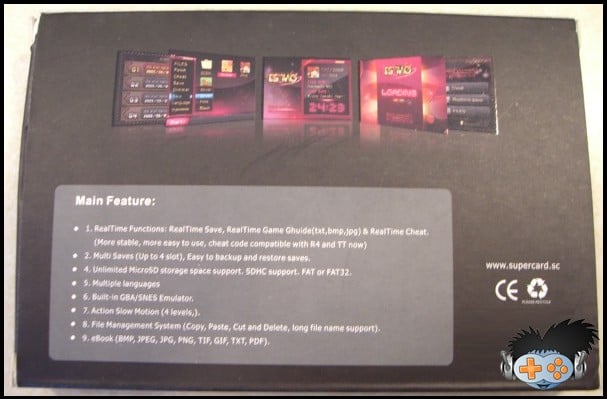
Official Features List (Corrected):

* Real time functions: real-time save, real-time game guide (txt, bmp, jpg), and real-time cheat.
* Multi-saves (up to 4 slots), easy to back-up and restore saves.
* Unlimited microSD storage space support. SDHC support. FAT or FAT 32.
* Multiple languages.
* Built-in GBA/SNES Emulator.
* Action slow motion (4 levels).
* File management system (copy, paste, cut, and delete). Long file name support.
* E-book in .BMP, .JPEG, .JPG, .PNG, .TIF, .GIF, .TXT, and .PDF formats.

The official features contains some “Engrish”, misspelled words, and dual index formatting. Based on the package description, someone with little to no knowledge of this hobby might easily pass this card off as being “cheap junk.”

The list includes the phrase “unlimited microSD storage space support,” a selling tactic lie for which I have no appreciation. The included paper manual has an image of a microSD card and the box includes the phrase “SDHC” and a printed SDHC logo. This card clearly only supports SDHC external media, and as consumers we know that the limitation of SDHC cards is 32 GB.

The list mentions SNES emulation, something which has not yet been implemented by Team SuperCard or the EOS Operating System.

E-book support includes a listing of mostly image formats and skips some dedicated E-book formats (.EPUB, .LIT, .LRF, .MOBI, etc). I would have preferred that the image formats were listed under an appropriate Image heading and for .TXT and .PDF to remain under the E-book heading.

The feature list lacks any mention of video/multimedia formats. The card was publicized as supporting drag/drop video codec playback. This is another feature not yet implemented by Team SuperCard or the EOS Operating System.

Oddly there is no mention of the “plug-in” system for creating custom icons used as launching points for NDS Homebrew and NDS ROM files. This is an interesting feature which not only helps organization through a favorites list but provides a way for users to personalize their theme.

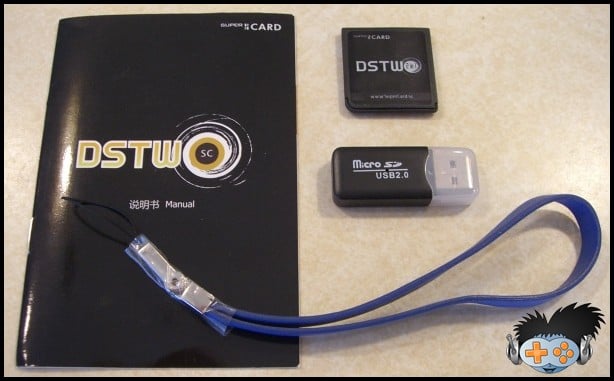
Contents:
  • 1x SuperCard DSTWO
  • 1x microSD reader
  • 1x User manual (in "Engrish" and Chinese)
  • 1x blue leather wrist strap
Packaging:


The SCDS2 ships in thin matte black colored cardboard box. The box measures approximately 5 and 1/2 inches by 3 and 3/4 inches by 3/4 of an inch. The left and right sides of the box fold inwards and secure with a cardboard flap. The box is printed with the “SuperCard” logo on all sides but the bottom. The top of the box includes a shiny DSTWO logo, a SuperCard Team logo, and a SDHC logo. The bottom of the box includes 3 shiny firmware screen captures of the EOS software. Also found on the bottom of the box is the official “Engrish” features listing and an official SuperCard URL (www.supercard.sc).


supercard ds two supercard ds two


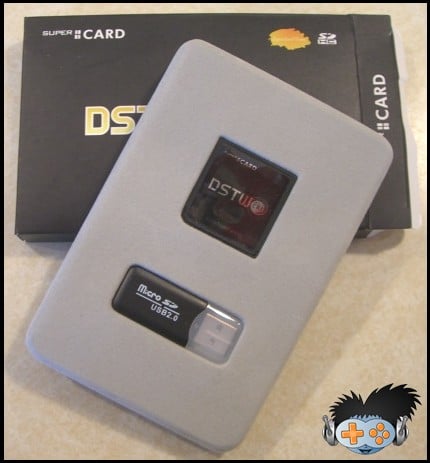
The box protects a thin plastic felt covered tray which slides in snugly and holds the SCDS2 and the microSD reader. Both of these items sit tightly into their respective cutouts, so well are they contained that users have reported damaging the shell of their SCDS2 while attempting to remove it. Removing either item is a simple as pulling out the tray and pushing on the back side to allow the item to lift away from the packaging. Under this tray sits the paper user manual and leather wrist strap. The wrist strap was not initially available for pre-ordered kits and later SCDS2 offered the strap as an additional purchase for resellers, causing each reseller to manually insert the wrist strap into each box. As a result of this some users have purchased a SCDS2 and not received the wrist strap, thus making it optional for the reseller and a random bonus for the buyer.

supercard ds two supercard ds two


The included microSD reader measures approximately 1 and 3/4 of an inch by 5/8ths of inch by 2/8ths of an inch. The black colored plastic shell feels smooth and sturdy to the touch. The USB connector is protected by a clear plastic cover which slides and locks into the plastic shell. If the cover is reversed it will not lock shut and should not be forced. This microSD reader is a functional alternative and a nice addition to the internal packaging contents, however, it is much larger than my preferred solution and from a generic manufacturing factory. The longevity of this microSD reader based on build quality alone seems fairly long, yet only time will tell.


supercard ds two supercard ds two

How to solve r4i gold game cheat and game save problems?

Tuesday, June 22, 2010

How to operate the game cheat on DS console kinda problem to newbie who is just trying to get fun but failed.With R4i gold card,
you can remove this kind of problem out of your worries.Now let’s see more details on how to operate game ,install game cheat and game save method.as below,
Game Menu Operation

- Choose the ‘Game’ to enter Game GUI; Press ‘START’ to go back to main menu.
-Press the ‘SELECT’ key to select the display mode in game interface (”File Display” and “Game Display” , Default is “Game Display”), “N files” and “N game” display at top bar on the top screen.
-Please be aware that the “SHELL,MOONSHL,_SYSTEM_”directory and the “_DS_MSHL.NDS “file will be hidden under the “Show Games Only” mode; Any other directories or files with hidden attributes will also be hidden.
- You can choose the display model (”Display all” and “Only Display Game”, default is “Only Display Game”) by pressing “SELECT”, and the top screen will display “N file” and “N Game”.
Please be aware that the “SHELL,MOONSHL,_SYSTEM_”directory and the “_DS_MSHL.NDS “file will be hidden under the “Show Games Only” mode; Any other directories or files with hidden attributes will also be hidden.
4-scale-lightness adjustment is available to the D Lite console by touching the sunny icon at the top left corner of game interface. (Not available to D console, the sunny icon will turn to be gray if it is D console.)
At the right top of the touch screen it is the “Soft Reset”; Red indicator means the “Soft Reset” function is off; Green indicator means the “Soft Reset” function is on. The users may point on the touch screen or press “R” button to switch the “Soft Reset” On/Off.
While the “Soft Reset” function is on, pressing “L+R+A+B+X+Y” can go back and forth to the game’s main menu; Please do not do this while saving, as it will lead to malfunction, It is recommended to go back to main menu before you function the “Soft Reset”.
If the error occurs on running games, please try to turn off the “Soft Reset”.
- The top screen displays the files under the directory, ‘Up/Down’ key for rolling, ‘Left/Right’ key for flipping. The current path and amount of the total files will show on the top, the scroll bar will show the location of the current file.
- The files under the directory will be sorted by file name, the directory (DIR) will display at the front. The (..) is the parent directory.

- The bottom screen display the details of the files and directory, the icon and title will be displayed if it is D/ID game.

- Press ‘A’ button or touch screen to enter the corresponding functions or run the game, press “B” button to go back
Running Game
- Choose the game you like in the game menu; Press ‘A’ button or touch screen to run.
- You can check the modified time of the archive, as it will be edited automatically while running the game.
- The file name of the archive is the same with the games, the extension is .SAV, can be backup or restored from PC at anytime.
SAV backup copy, restorationc
The archived file master file name with game same, expansion named .SAV

1. May momentarily restores the backup to the computer or from the computer.

2. Chooses the display mode according to SELECT, the choice thought completely the backup the .sav document, presses a key backup, the backup puts on file expansion named .bak. When needs to restore, the choice correspondence’s .bak duplicate file, presses a key confirmation restoration.
Operation of Auction Replay Cheat
Choose the corresponding game, if the official database (cheat.dat files under the _system_ folder) or the user database (usrcheat.dat files under the _system_ folder) contains the Auction Replay Cheat, the below screen will show the “Auction Replay Cheat (Y)” button, press the Y key or that button to enter the set up interface of cheat.
If the two databases will contain an action replay cheat to the same game, there will be two “action replay cheat” buttons. The official database is on the left, the user database is on the right.
On the top line of the above screen shows the game name, the top line of the below screen shows how many cheat code currently be selected and the total amount of the cheat codes can be selected, the bottom line of the below screen shows the version and created date of the current cheat database.
The function of the six buttons on the below screen is described separately as below:
“select all” press this button to select all the cheat code under the cheat opened circumstance.
“delete all” press this button to delete all the selected cheat code under the cheat opened circumstance.
“game open/close” press this button to control the cheat switch of this game, the left frame will show the current status.
“cheat open/close” press this button to control the entire cheat function switch, the right frame will show the current status.
“preserve and exit” press this button to preserve the current modification, and exit, the same function as well as press the START button.
“discards and exit” press this button to not preserve the current modification, and exit, the same function as well as press the SELECT button.
Under the cheat opened circumstance, use up and down arrow to choose each cheat code one by one; if it’s the cheat folder, press A to unfold/fold the directory.
Under the cheat-opened circumstance, use left and right arrow can go across 10 cheat codes.If do not need the cheat function, delete the cheat.dat files under the _system_ folder.
When the two databases will contain an action replay cheat to the same game, users can open the action replay cheat in the database to by their needs and another one would be close (close action replay cheat by turning master switch off, closing games or do not choose any action replay cheat), kernel will automatically choose the use of opened action reply cheat (Cheats in two databases opened to one game at the same time, then it will use the one in official database).
Before running game, under circumstance that a cheat has already been opened, in the process of running the game cheat can be temporarily closed by L+R+START+DOWN, you may press L+R+START+UP to open cheat.It is not to hard ,right?What are you waiting for ?Just go for fun now.
 
Acekard 2i   supercard ds two   m3i zero   iEDGE DS Card   itouch2   SuperCard DS ONE   Supercard DS ONEi

DSonei v1.0 SP3 EOS has been released by Supercard Team

Thursday, June 17, 2010

Digimartz.com is happy to inform Supercard ds onei fans that Supercard Team only use one week to update the EOS that released by 1ST June. From the updates, we can see that it has fix some important parts of card.Let’s see details as below,

updates released by 8th June.

1. Fixed blank screen when turn on cheat code function.
2. Fixed diy shin crash problem (hotkey setting).
3. Fixed crash problem when setting language to French.
See the EOS released by 1ST June,
DSONE/i Evolution SP3 OS Date :2010-06-01
For performance improve:
1, Anti-Piracy system upgrade, added new anti-piracy Engine.
2, Fixed some games problem:

GameWatch Game Collection

4825 - Saku Saku Jinkou Kokyuu Care Training (J)

4877 - How to Train Your Dragon (can not save)

4900 - Dragon Quest Monsters Posts joker2 (J)

4933 - Dementium 2 (U)

4951 - Are You Smarter than a 5th Grader? Game Time

4958 - Captain Tsubasa: Gekito No Kiseki(J)

4963 - Super Robot Taisen OG Saga Masou Kishin THE LORD OF ELEMENTAL (J)

4967 - Create Club DS: World Challenge 2010 (J)

- States husband’s super-blood! Plus Football League

4952 - Prince of Persia: The Forgotten Sands (E)

For UI update:

1, The skin can customize their own
2, Added the hot key customize defined (Default L+R+START)

Note: Old version patch database can not be use in new OS.

DSONE / i EOS SP3 default skin and add some file.

If you use third-party theme may be a problem, replace the default skin, or wait for the third-party skin update.

active.bmp, activehotkey.bmp, btn2.bmp, hotkeybk.bmp, noactivehoke.bmp

DSONE / i EOS SP3 default skin and add some file.If you use third-party theme may be a problem, replace the default skin, or wait for the third-party skin update.

active.bmp, activehotkey.bmp, btn2.bmp, hotkeybk.bmp, noactivehoke.bmp

Added the hot key customize defined (Default L+R+START)

Does the function attract your attention?so, just go straight to the following link and buy now w/ free shipping .

http://www.digimartz.com/supercard-ds-onei-for-dsi-nds-ndsl_p308.html

Supercard ds two

DSTWO GBA emulator Plugin has come

Tuesday, June 8, 2010

How to play more DS games via Supercard ds two  is a very hot question,or we can say that it is a common question to a flashcard.And it is amazing for some people who has developed this software and shared with DSTWO user.As of today, it has two versions,check the updates as below,
DSTWO GBA emulator plug-in v1.21 (2010-06-04)
* Added support popular *.cht file cheat code.
* Optimized Frame skip
* Pokemon supports real-time clock
* Fixed crash problem for some DSTWO.
* Exit the menu key change from Y to B.
* Fine tuning the UI.
Installation: Download the package, copy all folder to the root directory of MicroSD card and replace old.


how to setup dstwo gba plugin
VIDEO/AUDIO : video and audio settiing DSTWO GBA GUI
SAVE: Realtime save and read. 10 save slots
CHEATS: Cheat Code
Tool: Game tool
OTHER: Other setting.
EXIT: Exit to DSTWO desktop
NEW: Load a GBA ROM
RETURAN: Return to the game
RESTART: Reset the GBA emulator
Tip: To save power, the down screen will auto turn off. Press “X” to active this menu.
When a game is running slow you can try the following settings
1, increase the CPU frequency:
In the game press “X” button active the down screen menu. In the “Other” menu, adjust the “CPU frequency” , the default is 2 up to 4. For some delay games, you can try to increase the CPU frequency to solve, but need more battery power.
2, Change the frame skip:
In the game press “X” button active the down screen menu. In the “Video/Audio” menu, you can see, “Frame skip”, DSTWO GBA emulator with 9 skipping optional, default 2 is the best setting, part of the game (such as fighting games) can try to increase the frame skip resolve. Normal game can also increase the number of frames to speed up the pace of the game
“Game fast-forward” and “The Sands of Time” features
“Fast-forward the game” in the ” Video/Audio” setting, it is a very useful feature, 10 speed after opening the game, in the “fast-forward the game” when the game automatically shut down the sound.
“The Sands of Time” (Hotkey L + Y) feature inspired the naming of “Prince of Persia The Sands of time”, while holding down the “L” + “Y” game started back, backward to 10 seconds before, the time of backward can be adjusted. Fail in the game, Lost in the game, don’t worry, use “The Sands of Time” function can return to the state before you fail.
How to use cheat code in DSTWO GBA emulator
Ready to go:
Copy *.cht cheat code file into folder “\NDSGBA\gamecht”
Usage:
1. Press X button in the game, select “Cheats” 2. Select “LOAD CHEAT FILE”


dstwo gba setup step 1
3. Select the right cht file to open.                                 4.After cht file loading, cheat code can be  modified  by PAD key.


setup finished
Basis information
System Edition:V1.21
System Capacity:2.82MB
Language:Chinese/English
Click here to Download

First generation GBA plugin
DSTWO GBA V1.13(2010-05-18) Download
Installation:
1. Download and Unzip the software package.
2. Copy into MicroSD root directory.

where to buy:
http://www.digimartz.com/supercard-ds-two-scds2-for-nintendo-ds-ds-lite-dsi_p678.html

Super card DSTWO latest EOS released

Digimartz news reporter team is confirmed by Supercard Team, that a new DSTWO EOS was released and tested successfully .As the Supercard DSTWO was released nearly one month,user is getting more and more interesting on this card.Of course,more and more requests come up from player’s needed.In order to fulfil DSTWO fans’s demand,Supercard Team keeps striving on the latest kernel’s developing.,Here let’s check out what update of the recently three generation EOS .


SUPERCARD DS TWO (update:06-01) Download


* System Edition:V1.02

* System Capacity:40.88MB

* Language:Multi-Language


1.Update the file system, remove checking storage space function to improve reading speed.

2.Added system file protection, user could not operate on system files to avoid system corrupt.

3.Fixed save problem, when the patch database save size is different from customer save size setting, will keep customer save size.

4.Fixed a cheat code bug. Sometimes, the cheat code does not display.

5.Fixed GameWatch Games Collection, RPG tools.

6.1222 - Archime DS (J)

2360 - LOL (U)

2645 - Bakushow

Fixed these game downplay function.

7.Added DSTWO provide Soft-Reset function for Homebrew. Any homebrew software run “_dstwo/reset2desktop.nds” file can return to DSTWO desktop.

8.Fixed ReadTime Save display time error bug.

Note: Old version patch database can not be use in new OS.

EOS history :


SUPERCARD DSTWO (update:05-22) Download

1.Fix “Made in Ore”&”RPG Tool DS”

2.Fix “4951 Daigasso! Band Brothers”,The save is normal now

3.Fix “4952 Prince of Persia(Black screen Error)”,If you want to play,Premise is clean mode

4.Increase capacity detect in disk for enter the game,Avoid roms generate the bad damage the game system

Download&decompression DSTWO suite to root of TF,you’d better format the TF on first use

This suite contain DSTWO system core V1.01,GBA simulator V1.13,guide slot2 port&DS mode plugins and the latest moonshell software for DSTWO dedicated


SUPERCARD DSTWO (update:05-18) Download

1. RealTime Functions: RealTime Save(Enhanced, 3D game more stable), RealTime Game Guide(txt, bmp) & RealTime Cheat. (More stable, more easy to use, cheat code compatible with popular cheat file)

2. Multi Saves (Up to 4 slots), Easy to backup and restore saves.

3. New exclusive feature. Free Cheat function. During game play will allow you to search for and enable various cheats and hacks, such as modifying or even locking your characters health.

4. Unlimited MicroSD storage space support. SDHC support. FAT or FAT32.

5. Multiple languages (English, Simplified Chinese, Traditional Chinese, French, Italian, Korean, Japanese, Spanish)

6. Built-in GBA Emulator. More Emulator will be developed on schedule. Such as SNES.

7. Hotkey user-defined.

8. New Hardware Control Action Slow Motion (Up to 4 levels).

9. File Management System (Copy, Paste, Cut and Delete, long file name support).

10. eBook (BMP, JPEG, JPG, PNG, TIF, GIF, TXT, PDF).

11. New exclusive feature. Intelligent clean mode, automatically detect memory card speed and save type.

12. New exclusive feature. Hardware defence DS Anti Piracy. No Patch needed.


Where to buy :

http://www.digimartz.com/supercard-ds-two-scds2-for-nintendo-ds-ds-lite-dsi_p678.html