
 Posts
Posts


NOTE: SuperCard DS ONE has a micro firmware, user should download the SC DS ONE OS to the ROOT of the flash memory card before use it.
This is DS ONE version firmware 1.01 upgrade program. (Please notice your DS ONE version, Example: English version DS ONE can only run English version upgrade program)
Important: DO NOT turn off power when running upgrade program. And make sure the power light is GREEN, not RED.
Q:What's new? A:Fixed a FAT32 file system bug. This bug will make DS ONE halt and white screen.
Q:How to upgrade? A:Run "SC_firmware_upgrade101.nds" like a normal program from DS ONE menu. And follow the message displayed on screen.
Q:How do I know the firmware version? A:Hold L+R and turn on the power.
Q:What should I do, if upgrade progress halt? A:The DS ONE is corrupt. But there is a method to fix the corrupt firmware. 1. Need another good DS ONE, or DSLinker, or any other slot 1 flash card. 2. Run "SC_firmware_upgrade101.nds" from the hardware list above. 3. When upgrade message display, Do not turn off the power, swap insert the corrupt DS ONE. 4. Follow the message, can fix the currpot DS ONE and upgrade to new firmware.
Supercard ds two

DS iPlayer, iplayer, DS Video Player for Nintendo DS/ DSi
Thursday, April 15, 2010
DS iPlayer, the first hardware decode Video Player for the Nintendo DS lite or DSi. The iPlayer is a slot-1 media player cart that, besides homebrew, doesn't have any ROM loading functionality. DS iPlayer is solely intended for playing media files and homebrew. iPlay is able to play all the main format of videos such as RMVB,RM,AVI,FLV,MPG,WMV on DS, and no converting, allowing you watching movies and listening to music on DS more convenient.
Basic operation guide:
direction buttons: files selecting (page up/page down)
A button: OK / open file
B button: Cancel / Close file
X button: increase volume
Y button: decrease volume
L button: previous music
R button: next music, brightness adjustment.
SELECT button: close the bottom screen when movie playing.


Quick Start Guide:
1. Copy the unzipped system files into MicroSD card, which could be downloaded from the official website, or could be found in CD.
2. Copy movies files into the folder named "VIDEO". Copy music files into the folder named "MUSIC".
3. Turn on the power of DS, then you could enjoy the movies and music.
Tips: For better experience, please use earphone.
video:
Recommended format:
Avi,Rm/Rmvb,Mpeg,3gp,Flv,Mov, Wmv
Recommended parameter:
Resolution as 640 X 480 or lower
code rate as 2000 or lower.
Display mode:
Original mode,standard mode,full screen display
Audio:
Recommended format:
mp3,wma,ape,flac,wav,aac,ogg,ra,m4a
Playing mode:
Loop all, sequence play, random play, Loop single, single play.
L/R button:
could operate the function of music selecting on/off.
software:
iPlayer supports DLdi, which means fans could develop their own homebrews, and could also use the existing homebrews, such as DSOrganize,Moonshell, DSxReader, Reno Studio and so on.
files:
so far you could browse the files only.
System:
Brightness >> DSL---four level brightness adjustment, DSi---system tips to adjust brightness with SELECT + VOL+/VOL-
Language >> Chinese/English default, user could DIY more kinds of language.
Skins >> Standard skin only, user could add more.
Backlit >> user could customize the backlit time as 10s, 20s ,30s or do not close.
Homebrew patch >> open DLdi Port, open the function of soft reset.
Restore defaults
Including:
DS iPlayer
Basic operation guide:
direction buttons: files selecting (page up/page down)
A button: OK / open file
B button: Cancel / Close file
X button: increase volume
Y button: decrease volume
L button: previous music
R button: next music, brightness adjustment.
SELECT button: close the bottom screen when movie playing.


Quick Start Guide:
1. Copy the unzipped system files into MicroSD card, which could be downloaded from the official website, or could be found in CD.
2. Copy movies files into the folder named "VIDEO". Copy music files into the folder named "MUSIC".
3. Turn on the power of DS, then you could enjoy the movies and music.
Tips: For better experience, please use earphone.
video:
Recommended format:
Avi,Rm/Rmvb,Mpeg,3gp,Flv,Mov, Wmv
Recommended parameter:
Resolution as 640 X 480 or lower
code rate as 2000 or lower.
Display mode:
Original mode,standard mode,full screen display
Audio:
Recommended format:
mp3,wma,ape,flac,wav,aac,ogg,ra,m4a
Playing mode:
Loop all, sequence play, random play, Loop single, single play.
L/R button:
could operate the function of music selecting on/off.
software:
iPlayer supports DLdi, which means fans could develop their own homebrews, and could also use the existing homebrews, such as DSOrganize,Moonshell, DSxReader, Reno Studio and so on.
files:
so far you could browse the files only.
System:
Brightness >> DSL---four level brightness adjustment, DSi---system tips to adjust brightness with SELECT + VOL+/VOL-
Language >> Chinese/English default, user could DIY more kinds of language.
Skins >> Standard skin only, user could add more.
Backlit >> user could customize the backlit time as 10s, 20s ,30s or do not close.
Homebrew patch >> open DLdi Port, open the function of soft reset.
Restore defaults
Including:
DS iPlayer
Supercard DS Two release
Monday, April 12, 2010
Supercard will release a linker SLOT1 combining the strengths of its two flagship products: the DS Onei andiPlayer.
 - The Supercard Team has officially confirmed that the DSTwo GBAtemp.net would soon see the day.
- The DSTwo hardware will have a substantially similar to the iPlayer (hence with hardware acceleration and a 400MHz RISC processor)
- It will all like the iPlayer will be compatible DSi, and booted all games NDS & NDSi. It will have the same functionality as the latest firm DSONE with some news ... (Copy / paste / move ... ... the long names)
ChangeLog :
1. RealTime: RealTime Save, RealTime Game Guide (txt, bmp, jpg) & RealTime Cheat. (More stable, more "user frendly" cheat code cheat.dat single-file)
2. Saves multiple (up to 4 slot), easy backup and restore backup.
4. all μSD μSDHC and market will be borne
5. Languages: English, French, Chinese, Italian, Korean, Japanese, Spanish
6. SNES and GBA emulator natively (hoping that the SNES emulator uses the components of acceleration of the new linker for GBA emulator is already clear ^ ^)
7. Slow Motion (4 levels)
8. New options: Copy / Cut / Paste / Delete / Support files with long names.
9. Option eBook: BMP, JPEG, JPG, PNG, TIF, GIF, TXT, PDF
10. multimedia playback video (without conversion), audio, image ...
I already own the iPlayer and the Nintendo DS and Onei two linkers are what is best in their fields the union of these two products into one will be certainly a great product.
Wherever I look particularly supercard is listed as the interface functions / options / settings are already low as it will be on the top.
I expect to see also if the mode is clean concervé.
But anyway, I already made my order at Papa nowel to be under zapin ^ ^ (well if taken out by then).


The RTS and DSTwo has 4 slot. An automatic detection of 3D games to increase the stability of the RTS games has been added. The rate for the RTS in writing or reading is two seconds. The interface is much more beautiful thanks to the possibility of new PCB (hardware).
Backups can be renamed RTS (world exclusive). The player can change the name of each slot at end of RTS better recognize the backups. The backup information, date and time of last modification, are displayed.
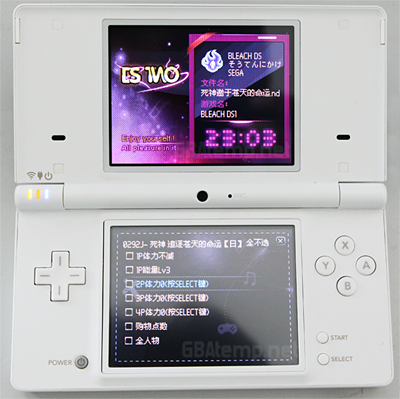
Ooh ooh small fresh news, some pictures of the interface and functions:
for realtime guide:


The RTG will support TXT files but also image files!
You can check your map at any time during the game
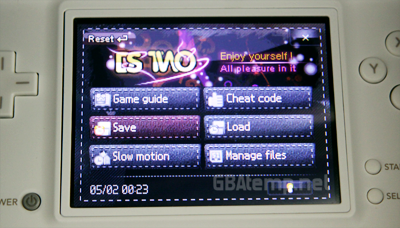
The slow motion in the ingame menu:

This mode has been completely revised and now controls the speed of processors which provides enormous stability and compatibility.
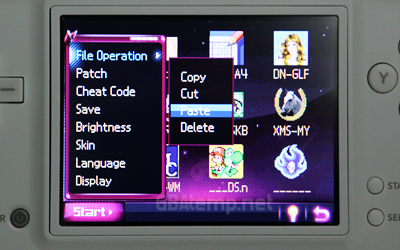
The file manager:

You can cut, copy, paste, erase, and of course launch applications and files ^ ^.
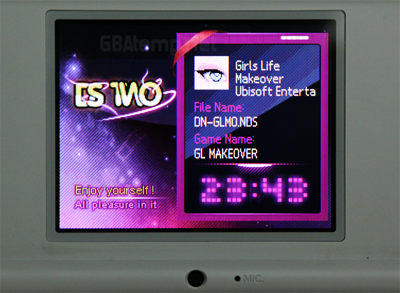
Some new pictures of the future linker:


- The DSTwo hardware will have a substantially similar to the iPlayer (hence with hardware acceleration and a 400MHz RISC processor)
- It will all like the iPlayer will be compatible DSi, and booted all games NDS & NDSi. It will have the same functionality as the latest firm DSONE with some news ... (Copy / paste / move ... ... the long names)
ChangeLog :
1. RealTime: RealTime Save, RealTime Game Guide (txt, bmp, jpg) & RealTime Cheat. (More stable, more "user frendly" cheat code cheat.dat single-file)
2. Saves multiple (up to 4 slot), easy backup and restore backup.
4. all μSD μSDHC and market will be borne
5. Languages: English, French, Chinese, Italian, Korean, Japanese, Spanish
6. SNES and GBA emulator natively (hoping that the SNES emulator uses the components of acceleration of the new linker for GBA emulator is already clear ^ ^)
7. Slow Motion (4 levels)
8. New options: Copy / Cut / Paste / Delete / Support files with long names.
9. Option eBook: BMP, JPEG, JPG, PNG, TIF, GIF, TXT, PDF
10. multimedia playback video (without conversion), audio, image ...
I already own the iPlayer and the Nintendo DS and Onei two linkers are what is best in their fields the union of these two products into one will be certainly a great product.
Wherever I look particularly supercard is listed as the interface functions / options / settings are already low as it will be on the top.
I expect to see also if the mode is clean concervé.
But anyway, I already made my order at Papa nowel to be under zapin ^ ^ (well if taken out by then).


The RTS and DSTwo has 4 slot. An automatic detection of 3D games to increase the stability of the RTS games has been added. The rate for the RTS in writing or reading is two seconds. The interface is much more beautiful thanks to the possibility of new PCB (hardware).
Backups can be renamed RTS (world exclusive). The player can change the name of each slot at end of RTS better recognize the backups. The backup information, date and time of last modification, are displayed.
Ooh ooh small fresh news, some pictures of the interface and functions:
for realtime guide:


The RTG will support TXT files but also image files!
You can check your map at any time during the game
The slow motion in the ingame menu:

This mode has been completely revised and now controls the speed of processors which provides enormous stability and compatibility.
The file manager:

You can cut, copy, paste, erase, and of course launch applications and files ^ ^.
Some new pictures of the future linker:
Supercard DSTWO Card for Nintendo DS, DS Lite & DSi
Thursday, April 8, 2010
The Supercard DS TWO is currently available for pre-orders only, the dispatch date was not revealed yet but we expect it to be in the coming weeks. If you purchase this product now, you will be notified as soon as we can confirm the dispatch date! You may also subscribe to our newsletter to make sure to receive the latest information about the SCDSTWO. Note that the image above is of the Supercard DS ONEi and is not indicative of the product.
IMPORTANT NOTE: If you are going to make a SCDS2 pre-order, be aware that anything you place in the same order will be shipped at the same time as your SCDS2. So if you want to order another product thats in stock and want to get it now, you should make a second order for it.
The Supercard DS TWO Card for Nintendo DS, DS Lite, DSi & DSi XL is a high-end slot-1 flash cart solution that allows you to launch games, run applications and play media directly from the device. Simply place your files onto either a micro SD or SDHC memory card (sold separately), insert the micro SD into your Supercard DSTWO, your cart into your DS, and turn the system on. Playing games and media has never been easier!
The Supercard DSTWO, with its beautiful Evolution (EOS) operating system and a powerful on-board processor offers unique and exciting features that you won't find anywhere else. Features such as full GBA emulation, a powerful new GUI, a real-time guide, an integrated auto-patch database, as well as being one of the few flash carts that allows users to upgrade the core firmware. If you're in the market for a sleek and feature-rich flash cart for the Nintendo DS, DS Lite, DSi or DSi XL, the Supercard DS TWO is the one for you.
IMPORTANT NOTE: If you are going to make a SCDS2 pre-order, be aware that anything you place in the same order will be shipped at the same time as your SCDS2. So if you want to order another product thats in stock and want to get it now, you should make a second order for it.
The Supercard DS TWO Card for Nintendo DS, DS Lite, DSi & DSi XL is a high-end slot-1 flash cart solution that allows you to launch games, run applications and play media directly from the device. Simply place your files onto either a micro SD or SDHC memory card (sold separately), insert the micro SD into your Supercard DSTWO, your cart into your DS, and turn the system on. Playing games and media has never been easier!
The Supercard DSTWO, with its beautiful Evolution (EOS) operating system and a powerful on-board processor offers unique and exciting features that you won't find anywhere else. Features such as full GBA emulation, a powerful new GUI, a real-time guide, an integrated auto-patch database, as well as being one of the few flash carts that allows users to upgrade the core firmware. If you're in the market for a sleek and feature-rich flash cart for the Nintendo DS, DS Lite, DSi or DSi XL, the Supercard DS TWO is the one for you.
Supercard DS TWO
The hype for the Supercard DS TWO has been building up for over 3 months now, and obviously I had to give you guys a shot at winning one, so here we are, a FREE SUPERCARD DS TWO is up for grabs, no registrations or any complicated forms. Thanks to our sponsor 0ShippingZone.com, one of the best webshops around for flash carts, we are able to host this raffle, so be sure to thank them.
Obviously because this is pre-release, we don't have the actual flash cart (we don't even have pictures of a final product yet). So the winner will get the Supercard DS TWO as soon as it is released, you will get it from the very first batch that 0ShippingZone receives. That is to say, you will be guaranteed a copy of the Supercard DS TWO once it is released.
So the rules are simple:
1) Post a reply to this thread before April 10th, 2010 12:00PM midnight PST.
2) Use either a valid DSDatabase username, or enter a valid email address in the username field. Please keep in mind that the email tied to your account or your provided email address will be used to contact the winner, so if you give me a faulty one, you are ensuring that you won't win.
3) In your reply, please state the ONE reason why you want the Supercard DS TWO.
4) DSDatabase reserves the right to change the rules and entries as they see fit.
5) In the event that you don't want to wait for the release date, exchanges may be made.
So, once again thank 0ShippingZone.com our generous sponsor for providing a Supercard DS TWO for the raffle! Be sure to buy from them if you have the chance to support us! Good luck everyone!
Obviously because this is pre-release, we don't have the actual flash cart (we don't even have pictures of a final product yet). So the winner will get the Supercard DS TWO as soon as it is released, you will get it from the very first batch that 0ShippingZone receives. That is to say, you will be guaranteed a copy of the Supercard DS TWO once it is released.
So the rules are simple:
1) Post a reply to this thread before April 10th, 2010 12:00PM midnight PST.
2) Use either a valid DSDatabase username, or enter a valid email address in the username field. Please keep in mind that the email tied to your account or your provided email address will be used to contact the winner, so if you give me a faulty one, you are ensuring that you won't win.
3) In your reply, please state the ONE reason why you want the Supercard DS TWO.
4) DSDatabase reserves the right to change the rules and entries as they see fit.
5) In the event that you don't want to wait for the release date, exchanges may be made.
So, once again thank 0ShippingZone.com our generous sponsor for providing a Supercard DS TWO for the raffle! Be sure to buy from them if you have the chance to support us! Good luck everyone!
EX4 release
1. Loads NDS Commercial Rom (Supports Soft Reset, Skin, AR Cheat Codes)
2. Built in GBA Emulator (Works on NDSL, NDSI and DSLL)
3. Built in Movie Player (Supports RMVB,AVI,MOV,DIVX,MPEG,FLV,3GP,ASF,WMV)
4. Built in Music Player (Supports P3,WMA,OGG,AAC,APE,FLAC)
5. Works With MicroSD Card up To 32GB (supports SDHC, FAT/FAT32)
6. Supports Multi-Language.
7. E-book/Picture viewer (Supports BMP, JPEG, JPG, PNG, TIF, GIF, TXT, PDF)
8. Supports 5-Scale Backlight Adjustment
2. Built in GBA Emulator (Works on NDSL, NDSI and DSLL)
3. Built in Movie Player (Supports RMVB,AVI,MOV,DIVX,MPEG,FLV,3GP,ASF,WMV)
4. Built in Music Player (Supports P3,WMA,OGG,AAC,APE,FLAC)
5. Works With MicroSD Card up To 32GB (supports SDHC, FAT/FAT32)
6. Supports Multi-Language.
7. E-book/Picture viewer (Supports BMP, JPEG, JPG, PNG, TIF, GIF, TXT, PDF)
8. Supports 5-Scale Backlight Adjustment
Supercard DS TWO announced,supprts GBA and NDS game on NDSi
Wednesday, April 7, 2010

The Supercard team have today confirmed that the development of the successor to the Supercard DSONE is now officially under way.
Their newest cart, unsurprisingly named the Supercard DSTWO, will be a mash up between the original DSONE and the hardware that was found in the iPlayer multimedia player. It will of course be DSi compatible, but will most likely not have 'i' in the title, but that is subject to change. That means you're going to have a cart on your hands that can play both Nintendo DS and Game Boy Advance games without any additional hardware. There will also be a SNES emulator, but we have not yet had the chance to see this in action.
Alongside the built in emulators, the DSTWO will also boast a revamped real-time feature system, multi language options, slow motion and a file management system.
Here's the official feature list for the Supercard DSTWO:
1. RealTime Functions: RealTime Save, RealTime Game Guide(txt,bmp,jpg) & RealTime Cheat. (More stable, more easy to use, cheat code compatible with R4 and TT now)
2. Multi Saves (Up to 4 slot), Easy to backup and restore saves.
4. Unlimited MicroSD storage space support. SDHC support. FAT or FAT32.
5. Multiple languages (English, Simplified Chinese, Traditional Chinese, French, Italian, Korean, Japanese, Spanish)
6. Built-in GBA/SNES Emulator.
7. Action Slow Motion (4 levels,).
8. File Management System (Copy, Paste, Cut and Delete, long file name support).
9. eBook (BMP, JPEG, JPG, PNG, TIF, GIF, TXT, PDF).
Below is the more info for this card.
After got a lot of suggestions from customers of DSONE, DSTWO cheat code system designed more easy to use and powerful. It's totally compatible with R4 and TT cheat code, it's very easy to use and do not need to have thousand of cheat code files in the folder.
Base of the new hardware, we redesign a new UI for DSTWO, it's much better than before.
DSTWO cheat code system not only compatible with R4 and TT cheat code, but also keep the real time cheat code system like DSONE. DSTWO cheat code system use own CPU power, so it's more stable and powerful, player can call out the cheat menu in the game whenever they want.
Subscribe to:
Comments (Atom)